
A film introducing an exhibition space could begin at the entrance, pass between hanging textiles, then turn towards an installation in the center of the room. As the camera approaches, fine surface textures become visible. It pulls back, and the relationship between the objects and the room becomes clear. Seedance 2.5: Giving a Video Idea a Clear Camera Path.
The subject has been chosen, and there is already a plan for filming it. The creator wants to determine where the camera travels, when it moves closer, and which details appear later.
Seedance 2.5 provides several ways to communicate those intentions. It understands composition and camera language in reference materials, supports clay render and motion references, and offers joint audio-video generation and subsequent editing. For someone who already has a sequence in mind, these capabilities provide concrete ways to explain it.
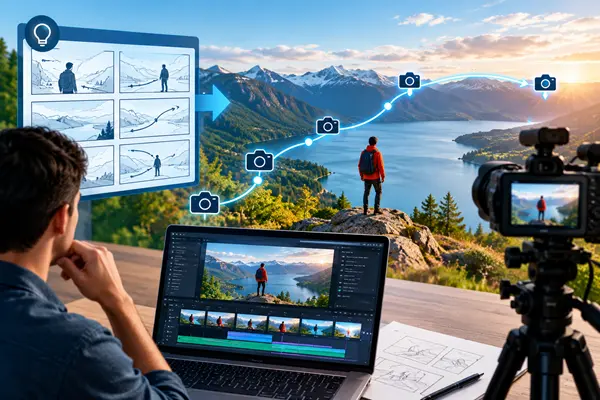
Establish Space and Movement with Simple Shapes
Clay render referencing is one of Seedance 2.5’s notable capabilities.
A clay render is a simplified three-dimensional scene. Basic shapes represent walls, display stands and installations, leaving detailed textures aside while establishing positions, proportions and movement paths.
For the exhibition film, a few rectangular forms could mark the entrance and stands, while flat surfaces represent hanging fabric. The camera passes between them before circling towards the central installation. Even this simple preview communicates where viewers enter and how they get to know the space.
Seedance 2.5 can use the spatial structure, camera angles and movement information in a clay render alongside visual references to generate content. Creators can establish the filming route first, then bring materials, colors and lighting into the finished picture.
This suits spatial presentations, animated scenes and demonstrations of product structures. When positions and relationships matter, simple shapes provide a clear way to express the creative plan.
Use Reference Video to Communicate a Way of Looking
Some camera movements are difficult to explain with a handful of adjectives.
The camera moves slowly along a corridor, pauses briefly at a corner, then reveals the main subject after someone leaves the foreground. Those choices determine the order in which viewers receive information and contribute to the scene’s mood.
Seedance 2.5 strengthens its understanding of reference video, including composition, shot size and camera language. An existing clip can communicate the filming approach, while other materials establish the new scene’s characters and objects.
A quiet architectural film could supply the pace for the exhibition video: unhurried movement, pauses for details, and a wider view as the camera enters an open area. The new content still takes place in the creator’s own gallery. The reference helps explain how the camera should observe it.
Motion references also make actions easier to describe. Hanging fabric moving gently creates a different atmosphere from fabric suddenly lifting in a gust. A suitable motion reference, accompanied by an explanation of its role, gives the idea a more specific basis.
The same approach is useful for dance animation, moving installations and scenes with people. Speed, range and direction can be communicated through material that everyone can watch.
Let Each Reference Explain a Different Detail
A video with a clear visual direction often draws on several sources.
An interior rendering establishes the overall palette. Close-up photographs record a work’s surface. Character artwork defines clothing, while another clip demonstrates a preferred movement rhythm. Each material explains a different part of the idea.
Seedance 2.5 supports up to 30 images, 10 video clips and 10 audio clips as references in a single generation. That variety gives creators ways to supply separate references for appearance, action and sound.
In the exhibition film, photographs of the installation define its shape and texture. Images of the room establish walls and flooring. Character references determine how visitors look. The text describes the new event: where a person enters, which work they stop beside, and where they look next.
This also suits animation projects with an established set of character designs. Faces, clothing, personal objects and voices can each have references, giving subsequent scenes familiar details to build on.
For brand teams, product detail images, environmental material and filming references can contribute to the same idea. Visual assets already prepared for a project continue to have a role in video creation.
Give the Picture Time to Develop and Sound a Role to Play
Seedance 2.5 can generate up to 30 seconds of video in a single pass and supports further extension. That duration leaves room for camera movement, setting and character reactions.
The exhibition film could take viewers through the entrance, slow down beside the fabric, then approach the central installation. A final, more distant view shows the scale of a visitor relative to the work.
Each part has a purpose. The entrance establishes direction, the closer view reveals detail, and the retreating camera explains the whole. The audience gradually becomes familiar with the space.
The model generates audio and video jointly, so sound can be planned along the same route.
A faint rustle becomes audible near the textiles. Footsteps echo as a person approaches the display. The sound grows quiet when the camera pauses at the work. These changes suggest distance and space, adding a sense of presence to the movement.
If the film needs an explanation, dialogue can follow the visual focus. As a particular detail is mentioned, the camera moves to an appropriate distance, giving viewers the chance to look while listening.
Keep Refining the Setting and Viewing Angle
Seedance 2.5’s green-screen editing capability offers another way to use existing subject footage.
A performance filmed against a green screen, for example, can become the basis for exploring how a person might appear in the gallery. Descriptions of the setting, illumination and surrounding elements help place that performance in a new visual context.
The model also supports camera perspective editing, reference-based editing and targeted changes using timestamps. Feedback can address a particular passage: a lower viewpoint when entering, a different angle during the approach to an artwork, or another position for a visitor’s pause.
These capabilities suit the gradual refinement of an established idea. The space and camera route can be planned first. Reviewing the picture then helps identify what deserves further attention.
A project can also begin with simpler material. With only a gallery rendering available, the image to video website offers a place to try a short camera movement and explore the feeling of moving forwards from that composition. Which work attracts attention first, and whether the foreground provides a useful reveal, can be discussed from the resulting sequence.
Seedance 2.5’s creative control becomes tangible through these specific choices. Spatial references establish structure, motion material explains movement, the camera determines the viewing order, and editing provides ways to revise the result.
An exhibition film may ultimately leave viewers with a clear impression of a place: the textiles hanging near the entrance, the scale of the central installation, and the texture that only became visible when the camera moved closer.